REA: Following a Feature Through an App with an AI Agent
I came across REA while looking at agent skills. The name stands for Reverse Engineer Anything, which made me curious enough to read through the docs and try a small example.
The useful question for me is pretty ordinary: where does this button lead, and what code actually does the work?
What REA adds
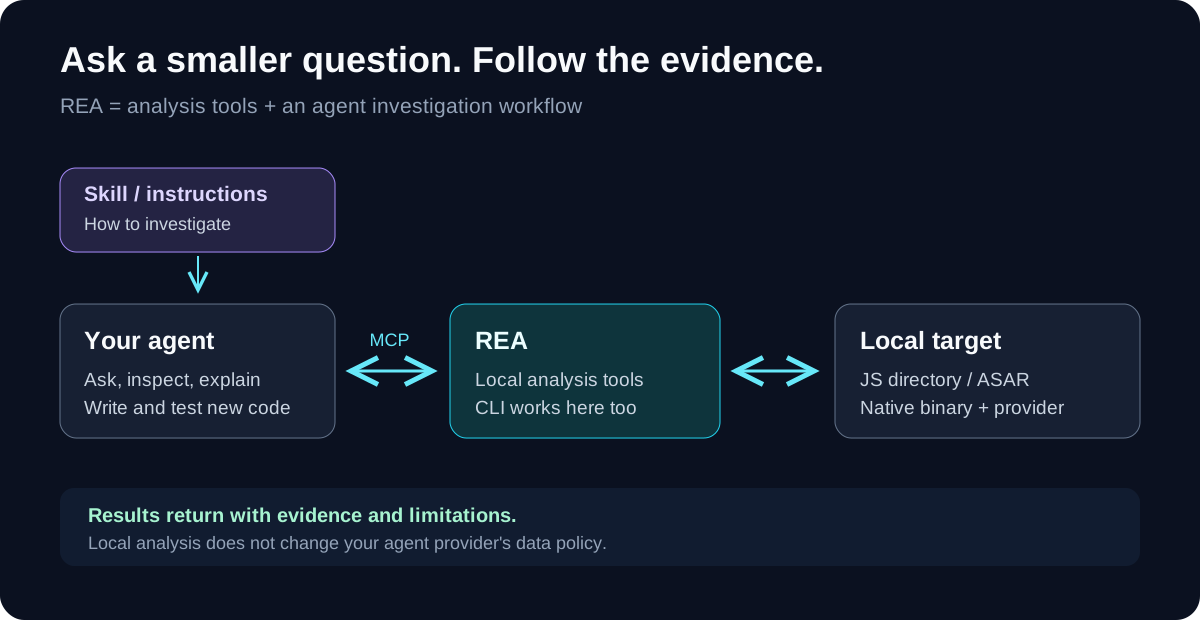
REA gives an agent tools to inspect software: JavaScript/Electron packages, native binaries, .NET assemblies, and websites. The agent asks questions, calls the tools, and works through the returned evidence. There is also a CLI for direct inspection. Native decompilation uses a separate analysis provider such as Hopper, Ghidra, or IDA. Project overview.
There are two parts worth distinguishing:
- The skill gives the agent investigation instructions.
- The MCP server exposes the analysis tools.
Installing the skill alone does not register the server. The project’s setup command installs matching instructions and configures the connection. Setup documentation.
The smallest useful experiment
I started with static Electron analysis because it needs no native decompiler and does not run the target application. REA reads a directory or an app.asar archive and reconstructs the relationships it can recover from the files. Static analysis guide.
For this example, use Node.js 22.19+ within 22.x, 24.11+ within 24.x, or 26+, plus npm. These are the package’s supported Node versions. On Linux, also have a procps-compatible ps on your PATH.
Download and unzip my small clipboard fixture, then open a terminal inside its rea-demo folder:
npx -y rea-agents@6.5.0 analyze-javascript-application "$PWD" --json > ../demo-evidence.json
This is an original source fixture, not a packaged app. You do not need to install Electron or run npm install inside it. Keep the output outside the input folder. The CLI returns a complete evidence record; real applications can produce large files. CLI guide.
The fixture has one clipboard operation:
// preload.js
copy: (text) => ipcRenderer.invoke('demo:copy', text)

// main.js, inside the matching ipcMain.handle callback
clipboard.writeText(text);
My run with REA 6.5.0 found one exposed bridge member, one main-process handler, and one paired renderer transmission on the literal channel demo:copy. There were no JavaScript parse failures.
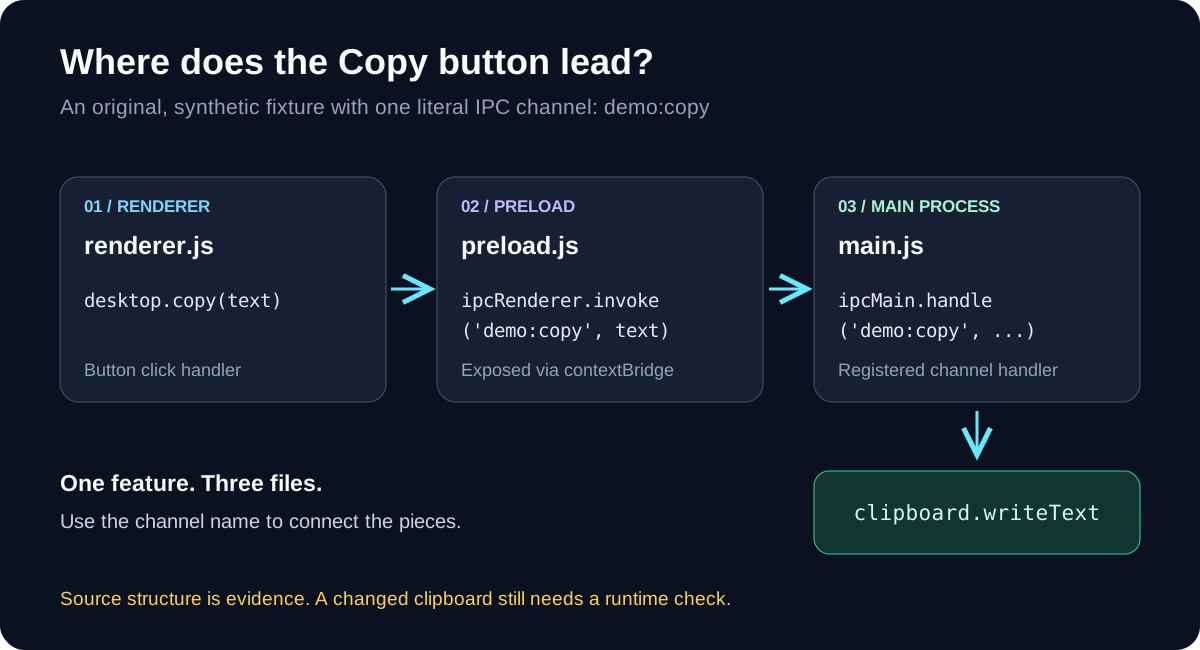
The channel name gives me a useful place to start reading. In a larger application, I would pick one equally specific feature: an export button, a search request, or a clipboard action.
Let the agent investigate
To connect REA to Codex:
npx rea-agents@6.5.0 setup --client codex
Review the proposed changes, approve the ones you want, then restart the agent. Running setup without --client codex opens the agent chooser. Setup can also offer Hopper; this JavaScript example does not need it. Installation guide.
My first prompt would be:
Use REA to inspect /absolute/path/to/rea-demo with static analysis.
Trace the demo:copy channel from the exposed desktop.copy API
to the main-process handler. Show the file locations and evidence.
Separate source observations, inferred relationships, and unknowns.
Do not launch the application or change files.
Replace the path with your extracted folder. REA’s feature tracing workflow can follow a literal channel, API, route, or string through the recovered graph.
What I would check before using the result
A matching channel is evidence of a possible connection. It does not prove the handler registered or that a clipboard write happened. REA’s graph documentation keeps observations, inferences, and unknowns separate.
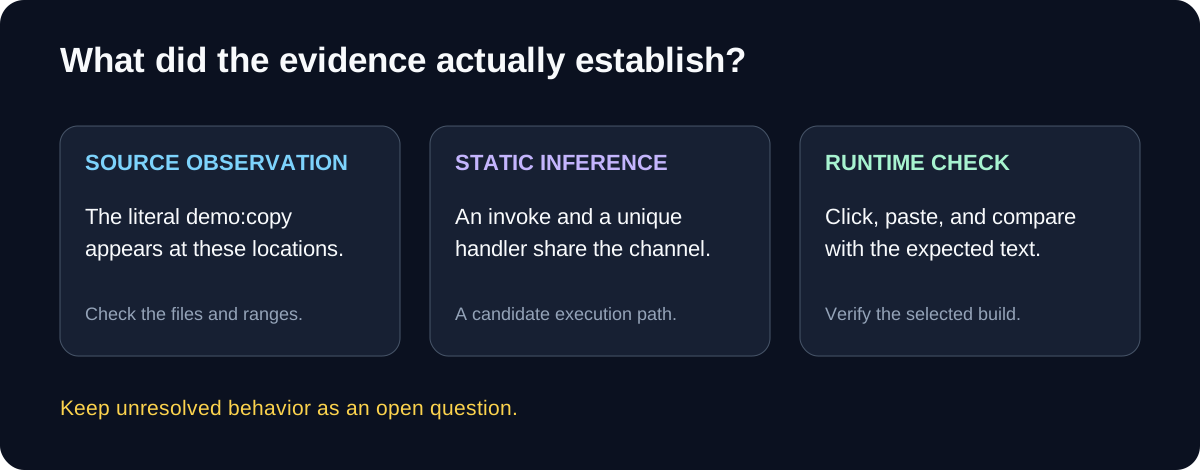
For a real app, I would verify the behavior, write down the requirement, then implement and test my own version. For copying text, Electron’s existing clipboard API is enough; REA becomes useful when the path to it is buried in unfamiliar code.
I would use software I own or have permission to inspect. Analysis runs locally, but tool results passed to an agent are still subject to its model provider’s data policy. REA FAQ.
That is the part I like: start with one question I can verify, follow the evidence, and keep the unanswered parts visible.
Checked on October 17, 2026 with the published rea-agents@6.5.0 package. The example commands pin that version because repository documentation can move ahead of npm releases.