NocoDB: A Fast Way to Put a Database Online
I read through nocodb/nocodb because I wanted to understand the claim:
NocoDB is the fastest and easiest way to build databases online.
After reading the repo and docs, I think the sentence makes sense with one condition:
NocoDB is fast when I need a usable database app,
not when I need to replace the database engine.
That distinction matters.
What NocoDB is
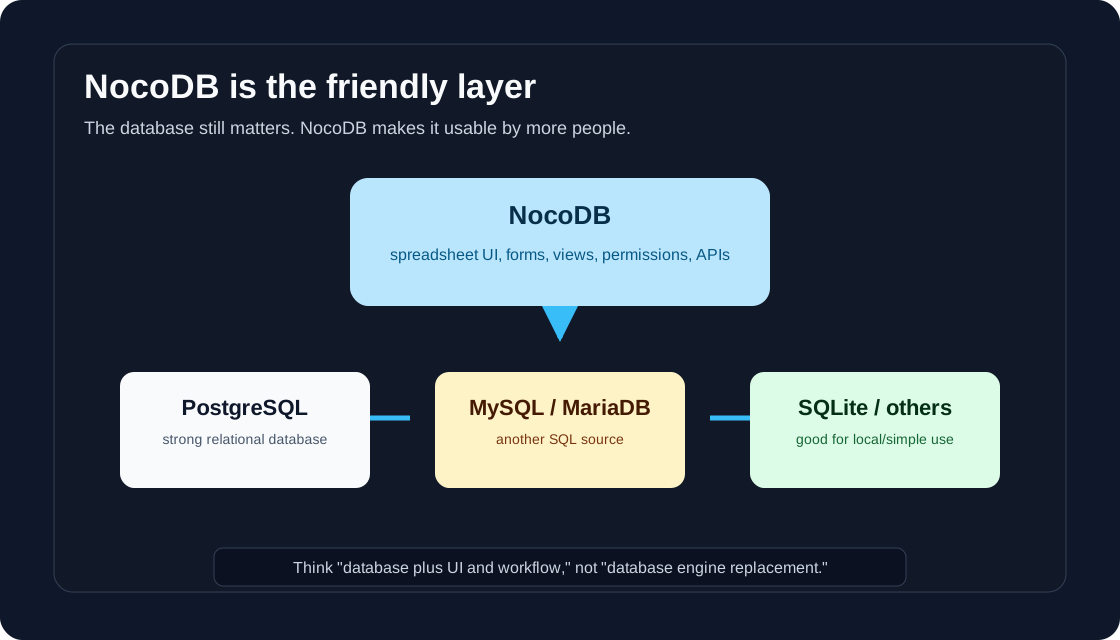
NocoDB is a self-hostable Airtable-like app for working with databases through a spreadsheet-style interface.
It gives me:
- tables and records
- grid, form, gallery, kanban, calendar, timeline, gantt, list, and map views
- field types like text, select, attachment, formula, links, lookup, and rollup
- role-based access control
- public or private shared views
- REST API and SDK access
- integrations for chat, email, and storage
It can use databases like PostgreSQL, MySQL, MariaDB, SQL Server, and SQLite as data sources. The docs recommend modern MySQL and PostgreSQL versions for compatibility and performance.
One important note: the current repo says NocoDB is licensed under the Sustainable Use License. So I would describe it as free and self-hostable, not casually assume every use case is open-source in the OSI sense.
NocoDB vs PostgreSQL
PostgreSQL is a database engine.
NocoDB is an application layer over a database.
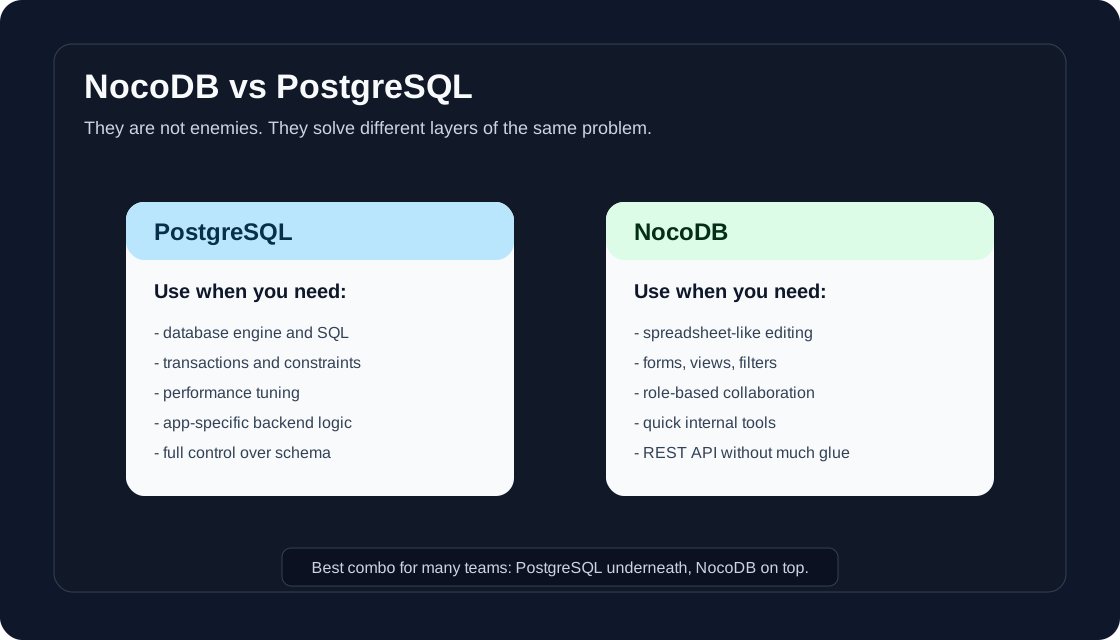
I would use PostgreSQL directly when I need:
- strong SQL control
- transactions
- constraints
- indexes
- performance tuning
- custom backend logic
- a serious production data model
I would use NocoDB when I need:
- a quick internal tool
- a spreadsheet-like UI
- forms for data entry
- filtered views for different teams
- non-engineers editing data safely
- a REST API without writing much glue code
The best setup is often both:
PostgreSQL stores the data.
NocoDB makes the data easy to operate.
Why it can feel fast
Normally, if I want an internal database app, I may need to build:
- backend CRUD APIs
- table UI
- filtering and sorting
- form validation
- permissions
- export/import
- sharing
- audit or admin flows
With NocoDB, many of those parts already exist.
That is why it can feel fast. I am not avoiding database design. I am avoiding rebuilding the boring admin interface for the hundredth time.
How I would try it locally
For a quick local test, the README shows Docker with SQLite:
docker run -d \
  --name noco \
  -v "$(pwd)"/nocodb:/usr/app/data/ \
  -p 8080:8080 \
  nocodb/nocodb:latest
Then open:
http://localhost:8080/dashboard
That is fine for trying the UI.
For anything serious, I would use PostgreSQL instead of local SQLite.
The README also shows NocoDB with PostgreSQL using NC_DB:
docker run -d \
  --name noco \
  -v "$(pwd)"/nocodb:/usr/app/data/ \
  -p 8080:8080 \
  -e NC_DB="pg://host.docker.internal:5432?u=root&p=password&d=d1" \
  -e NC_AUTH_JWT_SECRET="change-this-secret" \
  nocodb/nocodb:latest
In production, the docs say mandatory environment variables should be set. I would pay attention to at least:
NC_DBNC_AUTH_JWT_SECRETNC_REDIS_URL- admin email/password or proper auth setup
- storage configuration for attachments
A simple real example
Suppose I need a lightweight content tracker for this blog.
Tables:
Posts
Topics
Sources
Assets
Views:
Drafts
Ready to publish
Needs sources
Published calendar
Forms:
Submit a new topic idea
Add a source link
Upload an image asset
This is exactly the kind of thing where NocoDB feels practical. I do not need a custom app. I need a small database that humans can actually use.
Deploying to AWS or GCP
For cloud deployment, I would keep the shape simple:
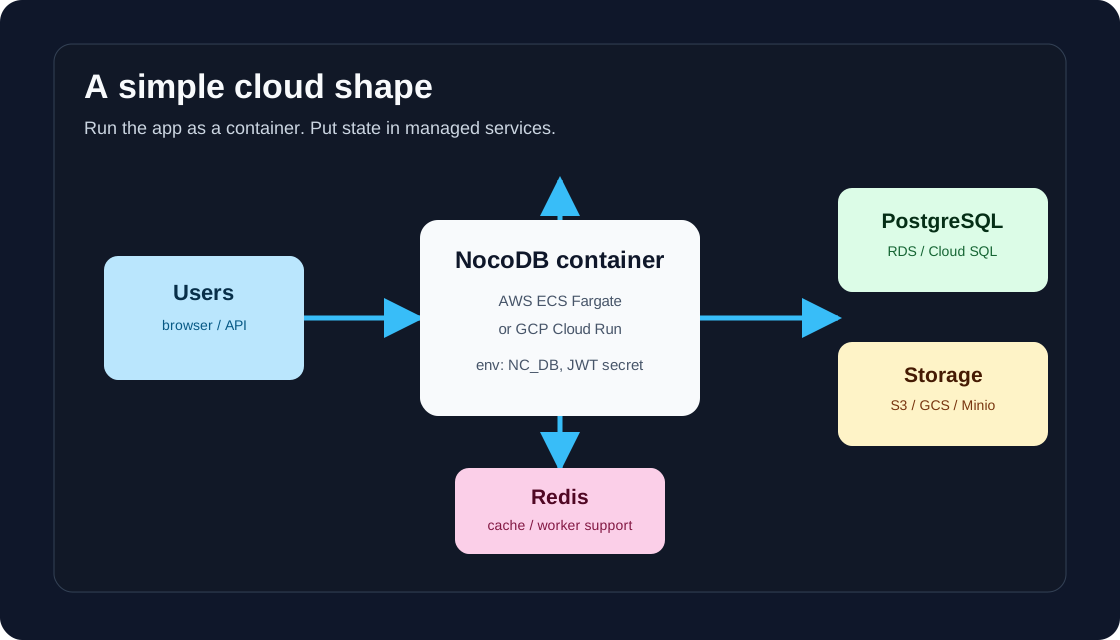
On AWS:
- run NocoDB as a container on ECS Fargate
- use RDS PostgreSQL for
NC_DB - use ElastiCache Redis if needed
- use S3-compatible storage for attachments
- put the service behind an HTTPS load balancer
- store secrets in AWS Secrets Manager
The official docs include an AWS ECS Fargate guide and show task definition/service steps.
On GCP:
- run NocoDB on Cloud Run
- use Cloud SQL PostgreSQL
- use Memorystore Redis if needed
- use Cloud Storage for attachments
- store secrets in Secret Manager
The official docs include a Cloud Run guide: pull the Docker image, tag it for Google registry, push it, and deploy with gcloud run deploy.
My practical rule
I would choose NocoDB when the first version needs to be useful this week.
I would choose direct PostgreSQL plus a custom app when the product needs deep domain logic, heavy traffic, strict workflows, or a UI that is core to the business.
So the simple rule is:
Need a database-powered internal tool fast? Try NocoDB.
Need a custom product backend? Use PostgreSQL directly and build the app.
Need both? Put NocoDB on top of PostgreSQL.