Headless CMS vs Building the Backend Yourself
I used to put “headless CMS” and “backend API” in the same bucket.
After reading the docs from Contentful, Strapi, Directus, Storyblok, and Next.js, I think the cleaner answer is:
A headless CMS is a content backend.
A custom backend is a product backend.
Sometimes I need one. Often I need both.
What a headless CMS really does
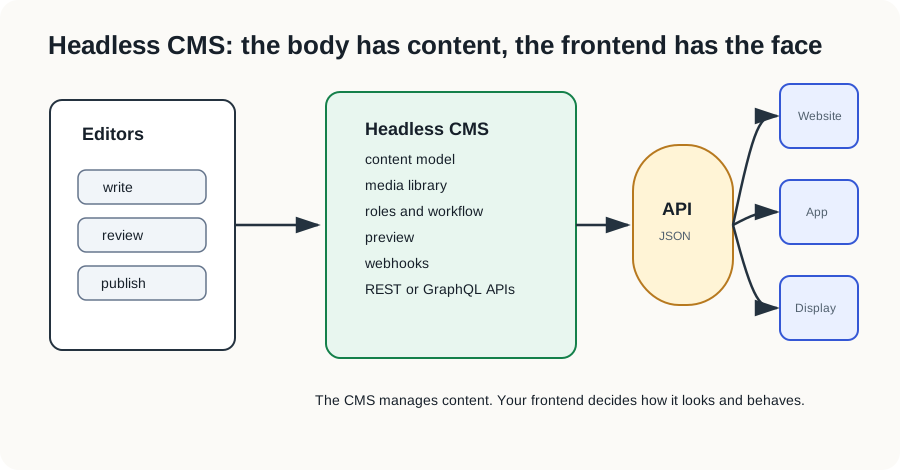
A headless CMS separates content management from presentation. Editors work in the CMS. The website, mobile app, or any other frontend fetches the content through an API.
Most tools in this space give me a few things out of the box:
- content models
- editor UI
- media library
- drafts and publishing
- roles and permissions
- REST or GraphQL APIs
- preview and webhooks
- localization, depending on the tool and plan
That is useful because content work has boring hidden cost. If I build everything myself, I need to build not just the API, but also the admin UI, image upload, editor roles, preview, publishing state, and rollback story.
How it compares with building my own backend
If I build the backend myself, I can expose exactly the API I need. That is still the right move for product logic.
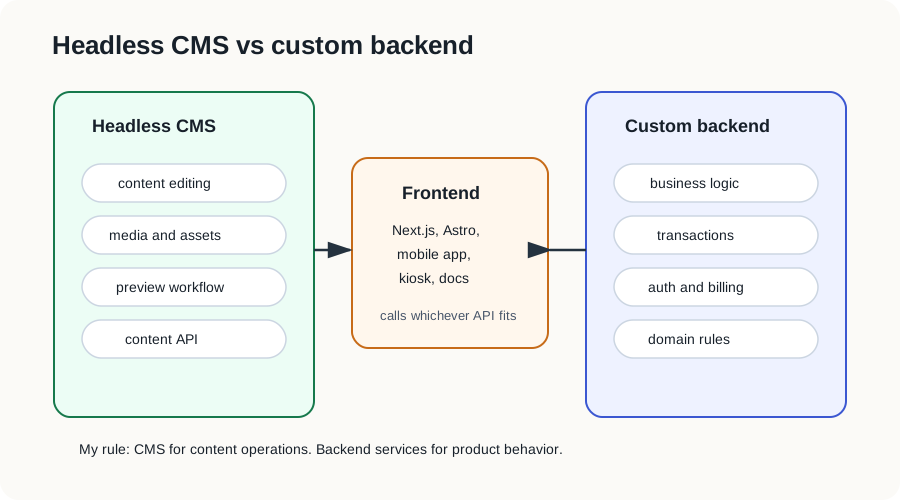
I would use a headless CMS for:
- blog posts
- docs
- landing pages
- case studies
- FAQs
- changelogs
- marketing pages
- content that appears in many places
I would build a custom backend for:
- login and accounts
- payments
- orders
- permissions that affect money or private data
- inventory
- booking flows
- complex business rules
- anything that needs strong transactions
The difference is not “no-code vs code.” The difference is ownership.
The CMS owns content operations. The backend owns product behavior.
A simple way to use it
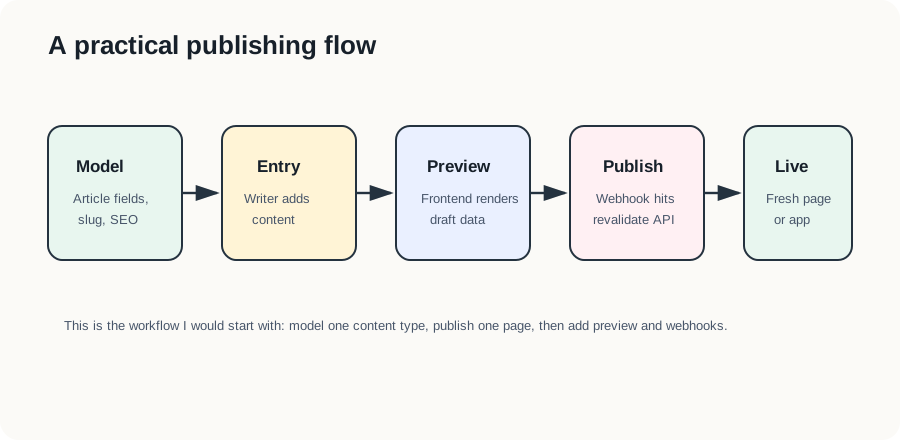
For a small website, I would start like this:
Article
- title
- slug
- summary
- cover image
- body
- author
- published date
- SEO title
- SEO description
Then the frontend fetches articles from the CMS API.
If I use Next.js, I would cache the page and revalidate it when content changes. Contentful’s docs describe webhooks as HTTP callbacks when content changes, and Next.js supports on-demand revalidation by path or cache tag. That is a practical combination:
Editor publishes article
CMS sends webhook
Next.js revalidates article page
Readers see fresh content
Example architecture
For a company website, I would keep it boring:
Next.js frontend
  -> Headless CMS for pages, blog, docs, FAQs
  -> Custom backend for accounts, billing, internal data
  -> Search service if content search becomes important
This gives marketing a place to publish without asking engineers for every text change. It also keeps the real product backend clean, instead of mixing blog content and payment logic in the same service.
Which CMS style I would pick
There are a few common paths.
SaaS CMS:
- Contentful, Sanity, Storyblok, and similar tools
- fast to start
- less infrastructure
- good editor experience
- pricing and vendor lock-in need attention
Self-hosted CMS:
- Strapi, Directus, Payload, and similar tools
- more control
- can run near my own database
- more ops work
- license and upgrade path need attention
Database-first CMS:
- Directus is a good example
- useful when I already have a SQL database and want admin UI plus generated APIs
Code-first CMS:
- Payload is a good example
- useful when I want the CMS model to live close to application code
There is no perfect answer. I would choose based on who edits the content, how often it changes, and how much backend logic the project really needs.
My practical rule
If the data is editorial, use a headless CMS.
If the data is operational, use a custom backend.
If the frontend needs both, call both.
That is the simplest architecture I trust:
CMS for content.
Backend services for behavior.
Frontend composes the experience.
Sources
- Contentful: Headless CMS explained
- Sanity docs: A very short introduction
- Strapi 5 documentation
- Directus API documentation
- Directus create a project guide
- Payload docs: Installation
- Storyblok: Visual Editor documentation
- Contentful docs: Webhooks overview
- Next.js docs: Fetching, caching, and revalidating
- MDN: REST