Trying Agent Autoloop: Events, Decisions, and CLI Agents
I looked into Agent Autoloop because I wanted to understand what keeps a command-line agent’s work moving after its first response. The useful question for me was ordinary: can a job ask for a decision, stop running, and continue when I answer?
I installed v1.8.3 and tried that sequence locally. It worked with a small deterministic command adapter. That verifies part of the orchestration, not the reasoning quality of an AI model.
What this project loops
There are several projects with similar names. This article is about KKKKhazix/agent-autoloop, an MIT-licensed automation hub for command-line agents.
An event enters the hub, a rule selects an agent and working directory, and a worker starts a CLI process. The process returns a result and exits. Its final response can also contain a structured receipt: ask a question, send a notice, schedule a later check, or emit another event. A human answer becomes input for another round. Versioned overview.
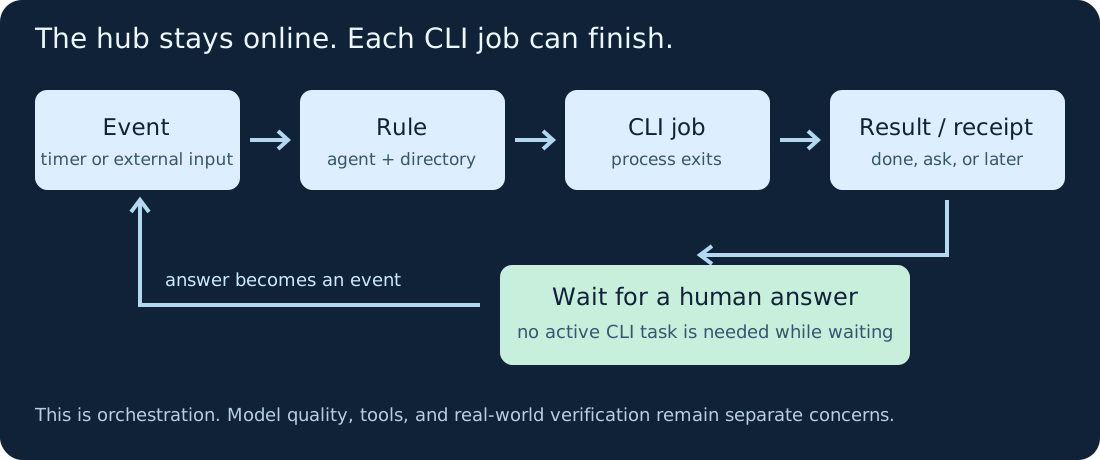
The hub remains online while a task waits. The CLI task does not have to stay running during that wait.
This is a different goal from an experiment optimizer such as Karpathy’s autoresearch, which modifies training code, evaluates a metric, and keeps or discards experiments. Agent Autoloop supplies event handling and follow-up; the quality of the agent, its task instructions, and the checks around its work still matter.
Start with one local task
A practical first use would be a local daily brief or a draft that needs a decision before the next step. I would start there before connecting issue trackers or a delivery pipeline.
My demo is intentionally smaller:
- A
demo.reviewevent starts a script. - The script checks that
draft.txtis nonempty and asks whether to keep it as a draft or mark it reviewed. - It exits without writing a review marker.
- After I choose Mark reviewed, a second round writes
reviewed.txtand finishes.
“Reviewed” is just a marker in this example. The script does not evaluate writing quality, and no model is involved. The project’s supported command adapter makes this a useful way to test the hub separately from an LLM. Adapter documentation.
Install and reproduce it
I tested on Linux with Node 24.22.1. The project requires Node 24 or newer. Its runtime can run directly from the checkout without npm install; the repository also has development dependencies for its own checks.
Download my demo and saved CLI evidence, unzip it, and enter the autoloop-demo directory. You need Node 24+ and Git. These commands use a POSIX shell:
git clone --depth 1 --branch v1.8.3 \
  https://github.com/KKKKhazix/agent-autoloop.git autoloop-src
node setup.mjs
export AGENT_AUTOLOOP_HOME="$PWD/.autoloop-demo"
node autoloop-src/bin/agent-autoloop.ts check
node autoloop-src/bin/agent-autoloop.ts up
The helper creates a fresh local configuration on port 3388, disables notification channels, and installs no system service. It refuses to overwrite an existing demo data directory. Keep that terminal open.
In a second terminal, in the same folder:
export AGENT_AUTOLOOP_HOME="$PWD/.autoloop-demo"
node autoloop-src/bin/agent-autoloop.ts emit demo.review --dry-run
node autoloop-src/bin/agent-autoloop.ts emit demo.review
node autoloop-src/bin/agent-autoloop.ts status
The dry run checks routing without dispatching work. The actual event should produce a pending decision after the first round finishes. In a fresh demo its card number is normally 1; use the number shown by status:
node autoloop-src/bin/agent-autoloop.ts answer 1 2
node autoloop-src/bin/agent-autoloop.ts status
Option 2 is Mark reviewed. Once the second round finishes, inspect reviewed.txt. Stop the foreground hub with Ctrl+C in the first terminal.
How the agent asks a question
The script reads the hub-provided context file through AGENT_AUTOLOOP_CONTEXT. When there is no answer yet, it prints a final response containing this receipt:
Draft inspected. Waiting for a local decision.

```agent-autoloop
{"ask":[{
  "title":"Review the local draft?",
  "text":"This demo only writes reviewed.txt in the demo folder.",
  "options":["Keep draft","Mark reviewed"],
  "key":"draft-review"
}]}
```
On the next round, it reads the selected answer from the context. A real CLI agent needs to follow the same output protocol, along with its task instructions. The receipt communicates intent; the local program is still responsible for performing the right action. Protocol.
What I actually observed
Before answering, status showed one waiting decision, zero running tasks, and one completed round. reviewed.txt did not exist.
After answering, it showed no waiting decisions and two completed rounds. The file contained:
Reviewed after an explicit local answer.
The why 2 timeline recorded the answer event and the second round’s completion. I also exercised the downloadable setup helper in a fresh data directory and got the same two-turn outcome.
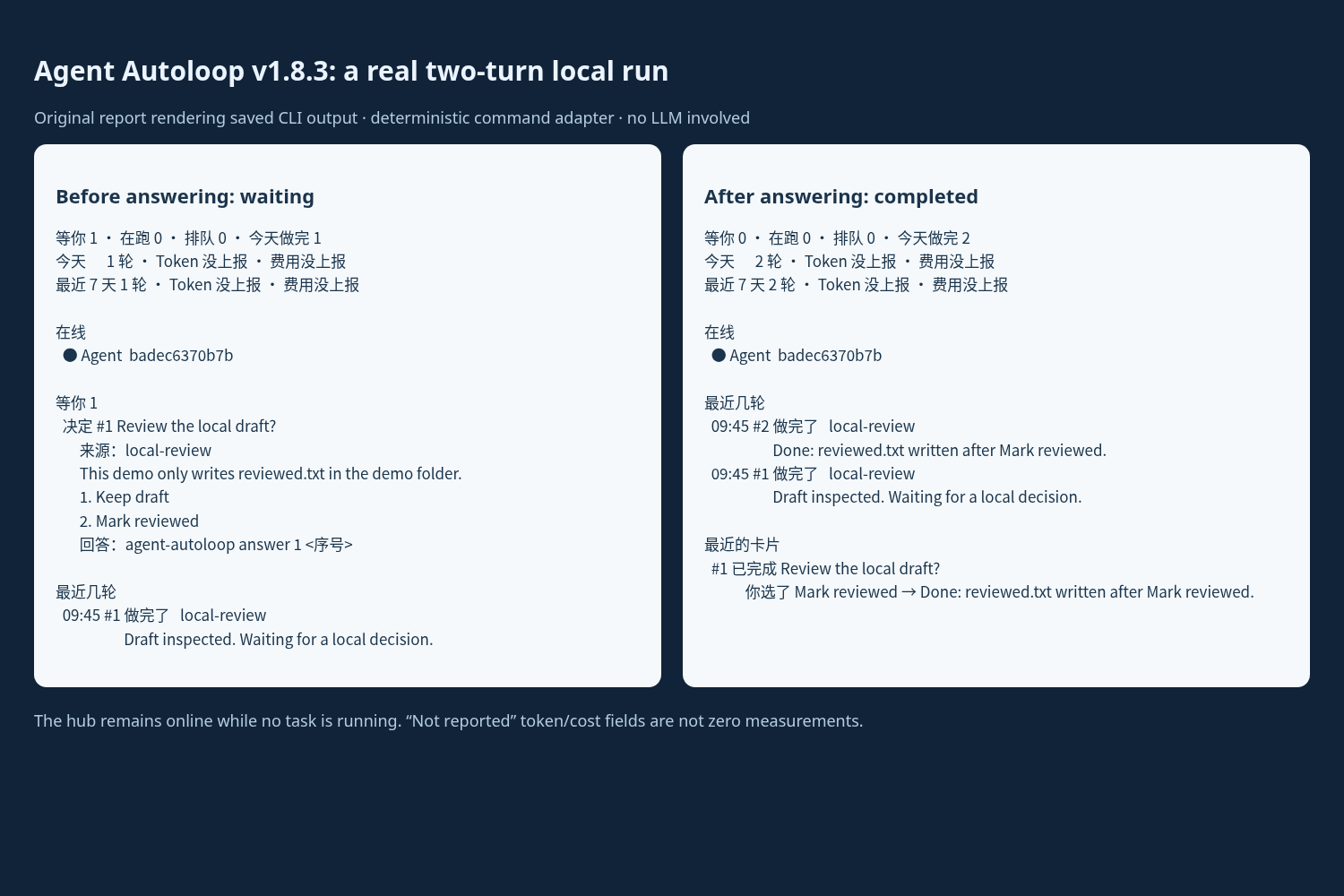
This screenshot is of an original report displaying the saved CLI output, not a built-in dashboard. The CLI labels are Chinese: 等你 means waiting for you, 在跑 running, and 做完 completed.
Token and cost fields said not reported. They were not zero measurements. I did not test Codex or Claude conversation resumption, external notification delivery, recovery after a crash, or automatic PR delivery in this experiment.
Moving from the demo to an AI agent
The normal upstream flow can initialize a logged-in Codex or Claude CLI and run agent-autoloop try to exercise a question and continuation. Do that in a separate installation, then validate the exact tools the background agent needs. A desktop agent having browser access does not establish that a background CLI has it too. Installation guide.
I would give the first real task a narrow directory, a clear completion check, and an explicit point at which it should ask me. I would also inspect the timeline and provider usage before adding schedules. In this demo, the stopping condition is concrete: one local marker written after a decision.
There is an important permission boundary: the generic command adapter does not sandbox an arbitrary program. Instructions to ask before publishing are not a substitute for operating-system or agent-tool permissions. For external actions, I would also design for retries so a repeated run cannot accidentally send or publish twice. The project’s security notes describe these boundaries.
My takeaway is that the interesting part is the lifecycle around a task: receiving work, recording what happened, waiting without an active CLI task, and continuing with the decision attached. That is useful plumbing. Whether the agent then does good work still needs a real acceptance check.