SDD: A Simple Way to Build From a Spec
I spent some time reading about SDD because the acronym is a little confusing.
In older software engineering material, SDD can mean Software Design Description. IEEE 1016 uses it that way: a document for recording and communicating software design information.
But in the current AI-assisted development world, SDD usually means Spec-Driven Development. That is the meaning I care about in this post.
The simple idea:
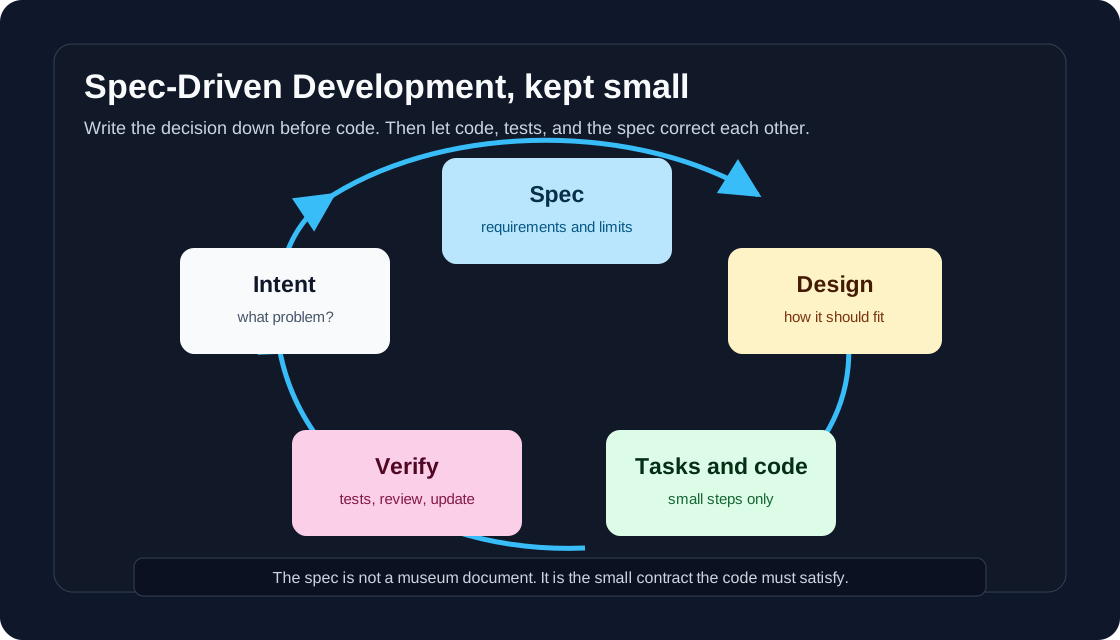
Write the spec first.
Use the spec to drive design, tasks, code, and tests.
Keep the spec updated when the decision changes.
That is it. No ceremony needed.
Why I like the idea
I have jumped into code too early many times.
At the beginning it feels fast. I open the editor, make a few changes, and the feature starts to appear. Then the hidden questions arrive:
- Should this work for guests or only logged-in users?
- What should happen when the API fails?
- Do we need to support mobile?
- Is this a new table or an extra column?
- How do we know the feature is done?
When those questions show up late, code becomes expensive to change.
SDD is useful because it forces the messy thinking to happen a little earlier. Not all of it. Just enough.
The Microsoft article about GitHub Spec Kit describes this well: SDD is not about dry documents or waterfall planning. It is about making decisions explicit, reviewable, and able to evolve.
That sentence matches how I want to use it.
What SDD is not
SDD is not writing a 30-page document before touching code.
SDD is not a replacement for tests.
SDD is not a magic way to make AI agents correct.
SDD is not useful for every tiny change. If I am fixing a typo, I do not need a spec.
For me, SDD is useful when the change has behavior, edge cases, or more than one reasonable implementation.
The smallest useful workflow
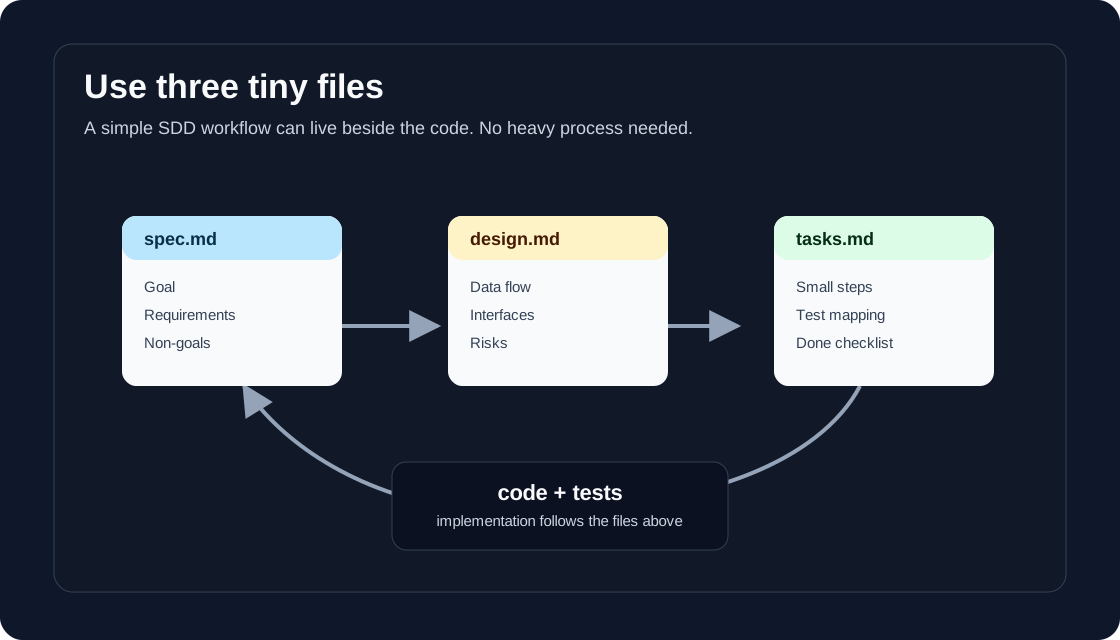
I like to keep SDD very small:
1. Write the intent
Start with one paragraph.
We want to add a reading progress bar to blog posts so readers can see how far they are through the article.
This is not the implementation. It is the reason.
If the reason is unclear, writing code will not make it clearer.
2. Write requirements
Use plain language. Make each requirement testable.
I like the EARS style because it is easy to read:
WHEN the reader scrolls, THE SYSTEM SHALL update the progress bar.
WHEN the page loads, THE SYSTEM SHALL start progress at 0 percent.
WHERE the screen width is small, THE SYSTEM SHALL keep the bar visible.
EARS came from requirements engineering research. The point is not the exact words. The point is to avoid vague requirements like:
The progress bar should work nicely.
“Nicely” is not testable.
3. Add non-goals
This part is underrated.
Non-goals:
- No analytics tracking.
- No server-side storage.
- No redesign of the article page.
Non-goals stop the feature from expanding while you are coding.
They also help AI tools. Without boundaries, an AI assistant may “helpfully” build more than you asked for.
4. Write a small design note
The design note answers “how will this fit into the system?”
For a simple feature, it can be short:
Design:
- Add one progress element to the post layout.
- Use JavaScript to calculate scroll position.
- Keep styling in the existing post CSS.
- Do not add a dependency.
This is enough for a small task. For a bigger task, I would include data model changes, API changes, failure modes, and rollout notes.
5. Break it into tasks
Tasks should be small enough that I can review them.
Tasks:
- Add the progress bar markup.
- Add CSS for desktop and mobile.
- Add scroll calculation logic.
- Test on a long post and a short post.
- Check that the bar does not cover content.
If I am using an AI coding agent, this list matters a lot. It gives the agent a path. It also gives me a checklist for review.
6. Verify against the spec
At the end, I do not ask only “does the code look okay?”
I ask:
Does the implementation satisfy each requirement?
Did we accidentally violate a non-goal?
Did we learn something that should update the spec?
This last question is important. Specs are allowed to change. The danger is not changing the spec. The danger is changing the code and leaving the spec behind.
One screen example
Here is what a tiny spec might look like:
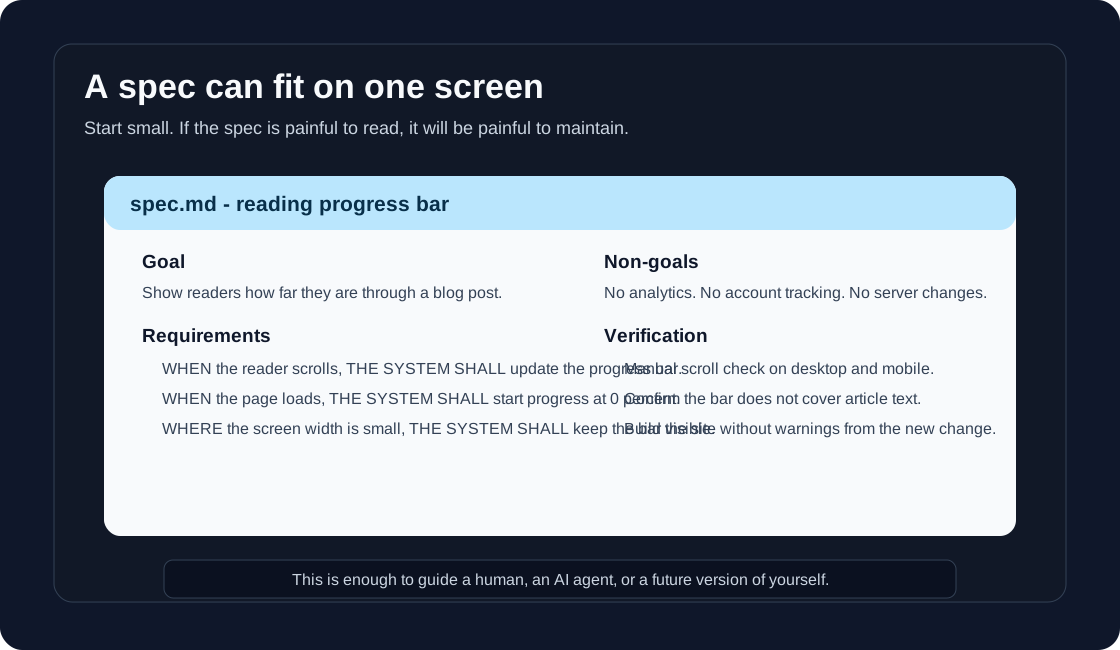
In markdown:
# Reading progress bar

## Goal
Show readers how far they are through a blog post.

## Requirements
- WHEN the reader scrolls, THE SYSTEM SHALL update the progress bar.
- WHEN the page loads, THE SYSTEM SHALL start progress at 0 percent.
- WHERE the screen width is small, THE SYSTEM SHALL keep the bar visible.

## Non-goals
- No analytics tracking.
- No server-side storage.
- No redesign of the article page.

## Design
- Add one progress element to the post layout.
- Use JavaScript to calculate scroll position.
- Keep styling in the existing post CSS.
- Do not add a dependency.

## Tasks
- Add markup.
- Add CSS.
- Add scroll logic.
- Test desktop and mobile.

## Verification
- Progress starts at 0 percent.
- Progress reaches 100 percent near the end.
- The bar does not cover article text.
That is not heavy. It is just enough structure to prevent guessing.
How this works with AI
SDD becomes more valuable when AI enters the workflow.
Without a spec, the AI assistant has to infer too much. It may produce code that looks good but misses the real requirement. With a spec, the assistant has a smaller target.
My simple prompt would be:
Read spec.md, design.md, and tasks.md.
Implement only the first unfinished task.
Do not change the requirements unless you explain why.
After implementation, list which requirements are satisfied and which still need work.
That prompt is boring. Boring is good here.
The goal is not to make the AI creative. The goal is to make the work traceable.
SDD compared with TDD and BDD
I do not see SDD as a replacement for TDD or BDD.
They focus on different layers:
| Practice | Main question |
|---|---|
| SDD | What should we build and why? |
| TDD | What test proves this unit of behavior? |
| BDD | What behavior should users observe? |
They can work together.
For example, SDD defines the requirements. BDD can express user-facing scenarios. TDD can drive the internal code. The spec keeps them pointed at the same goal.
Where SDD helps most
I would use SDD for:
- new features
- bug fixes with unclear root cause
- API changes
- database migrations
- permission changes
- behavior that affects users
- work done with AI agents
I would skip it for:
- typo fixes
- tiny CSS tweaks
- obvious refactors
- experiments I plan to throw away
The point is not to document everything. The point is to document the decisions that will hurt if misunderstood.
Mistakes to avoid
The first mistake is writing a spec nobody wants to read. Keep it short. Use bullets. Prefer examples.
The second mistake is mixing requirements and implementation too early. “Use Redis” might be a design decision, not a requirement. The requirement might be “rate limit requests per user.”
The third mistake is letting the spec go stale. A stale spec is worse than no spec because it gives false confidence.
The fourth mistake is treating SDD as a tool-only thing. GitHub Spec Kit, Kiro, and other tools can help, but the core habit does not require a tool. A markdown file is enough to start.
My simple rule
Before coding, I want to be able to answer four questions:
What problem are we solving?
What behavior must exist?
What are we intentionally not doing?
How will we verify it?
If I can answer those, the code usually becomes easier.
If I cannot answer those, coding is probably just a way to hide that I have not thought enough yet.